
Zillow Property Scraper
The Zillow Property Scraper by Scrapebit lets you extract detailed property information such as price, address, and listing details from Zillow. Designed for real estate professionals, investors, and researchers, it provides quick access to structured data for analysis and decision-making.
The Zillow Property Scraper extracts detailed property info like price, address, and property details from Zillow listings. Ideal for real estate pros, investors, and researchers, it works with Scrapebit’s user-friendly interface for quick data access and analysis.
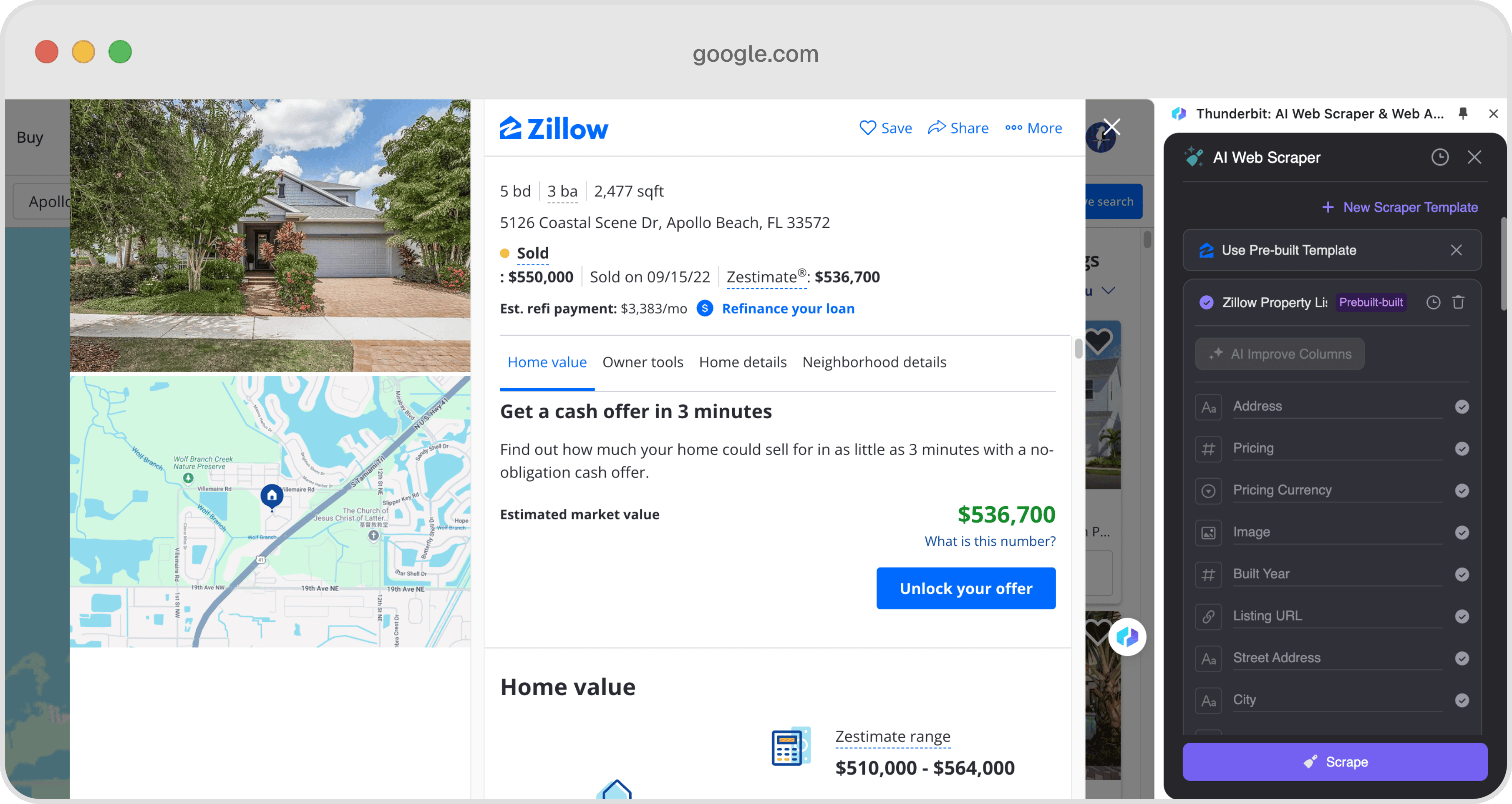
Example output
Each run returns the columns below as rows you can download as CSV or JSON, or send straight to Google Sheets, Notion, or a webhook.
📊 Columns Explanation
🤔 Why Scrape Zillow?
Scraping Zillow can provide a wealth of information for various professionals:
- Real Estate Agents: Gain insights into market trends and property values to better serve clients.
- Investors: Analyze property data to identify lucrative investment opportunities.
- Researchers: Collect data for studies on housing markets and urban development.
- Homebuyers: Compare properties and make informed purchasing decisions.
By using the Zillow Property Scraper, you can efficiently gather and analyze data to support your specific needs.
🛠️ How to Use Zillow Scraper

- Download and Install: First, download Scrapebit (as a Web App or Chrome Extension) and register an account.
- Navigate to Zillow: Go to a Zillow property listing page, such as this example.
- Activate the Scraper: A popup will appear, prompting you to use the pre-built template. Click to proceed. Remember, the pre-built scraper is a paid feature, but you can start a free trial to use it for free.
💰 Cost of Zillow Scraper
The Zillow Scraper costs 1 credit per run. A credit represents one output row of data. Scrapebit offers a free trial, allowing users to scrape up to 10 pages for free. After the trial, you can choose from various pricing tiers to suit your needs:
- Starter: $15/month for 500 credits.
- Pro 1: $38/month for 3,000 credits.
- Pro 2: $75/month for 6,000 credits.
- Pro 3: $125/month for 10,000 credits.
- Pro 4: $249/month for 20,000 credits.
🤖 You Can Also Use AI to Scrape Zillow
Scrapebit's AI Web Scraper offers an alternative method to scrape Zillow. With just two clicks, you can use AI to suggest columns and scrape data. The AI Web Scraper provides advantages such as:
- Data Formatting: Automatically formats data for easy analysis.
- Categorization: Categorizes data for better organization.
- Flexibility: Easily adapt to changes in website structure.
Using AI to scrape Zillow can save time and provide more comprehensive data analysis.
❓ FAQ
- What is a pre-built web scraper?
A pre-built web scraper is a tool designed to extract data from specific websites using predefined templates. It simplifies the data collection process by automating the extraction of relevant information. - What is Scrapebit?
Scrapebit is a Chrome Extension that helps users automate web tasks such as scraping data, filling forms, and summarizing content using AI. It enhances productivity by saving time and reducing manual effort. - How does the Zillow Property Scraper work?
The Zillow Property Scraper uses a predefined template to extract data from Zillow listings. Users can access detailed property information with minimal effort. - Is the Zillow Scraper free to use?
The Zillow Scraper is a paid feature, but Scrapebit offers a free trial that allows users to scrape up to 10 pages for free. - What is a credit in Scrapebit?
A credit in Scrapebit represents one output row of data. The number of credits required depends on the amount of data extracted. - Can I customize the data extracted by the Zillow Scraper?
The pre-built scraper uses a fixed template, but you can use Scrapebit's AI Web Scraper for more customization options. - How do I start a free trial with Scrapebit?
To start a free trial, download the Scrapebit Chrome Extension, register an account, and activate the trial from the extension interface. - What other websites can I scrape with Scrapebit?
Scrapebit supports scraping from various popular websites, including Google Maps, Yelp, and Amazon, using both pre-built and AI-powered scrapers.
📚 Learn More
To explore more about Scrapebit and its features, visit the Scrapebit Official Website or check out the Scrapebit YouTube Channel for tutorials and updates.
Ready to use this template?
Install the Scrapebit Chrome extension and start scraping in minutes.