Contact Information Scraper
The Scrapebit Contact Information Scraper helps you extract contact details from websites, directories, and PDFs. Use AI-powered field suggestions to quickly gather names, emails, phone numbers, and more for lead generation, research, or outreach. Ideal for marketers, recruiters, and sales teams seeking organized contact data.
The Scrapebit AI-Powered Contact Information Scraper is a powerful tool designed to extract contact details from websites, directories, and even PDFs. With Scrapebit's Chrome Extension, you can easily transform unstructured contact data into organized datasets. Whether you're a marketer, recruiter, or researcher, this tool simplifies the process of gathering essential contact information.
What can you scrape with Contact Information Scraper?
1. Scrape Contact Directory
The Contact Information Scraper allows you to extract detailed contact information from online directories, such as this example directory.
Steps:
- Sign up for Scrapebit — choose any access method: Web App for in-browser scraping, Chrome Extension to scrape any page you visit, or the REST API for automation.
- Navigate to the target contact directory page.
- Click AI Suggest Columns, which recommends column names like Full Name, Job Title, and more.
- Click Scrape to extract the data and download it in a structured format.

📊 Column Names: Contact Directory Data
2. Scrape Faculty Directory
The Contact Information Scraper can also extract faculty details from university or institutional directories, such as the University of Michigan Faculty Directory. This use case utilizes Scrapebit's subpage scraping feature to gather additional details from linked profile pages.
Steps:
- Install Scrapebit (as a Web App or Chrome Extension) and register your account.
- Navigate to the faculty directory page.
- Click AI Suggest Columns to generate column names like Full Name, Role Title, and more. Enable the subpage scraping feature to extract additional details from linked profile pages.
- Click Scrape to collect the data and download it in a structured format.

📊 Column Names: Faculty Directory Data
3. Scrape Contact Information from PDF
The Contact Information Scraper can even extract contact details from PDFs, such as research papers or reports. For example, you can scrape contact information from this PDF document.
Steps:
- Install Scrapebit (as a Web App or Chrome Extension) and register your account.
- Open the target PDF document in your browser.
- Click AI Suggest Columns to generate column names like People, Institution, and Email Address.
- Click Scrape to extract the data and download it in a structured format.
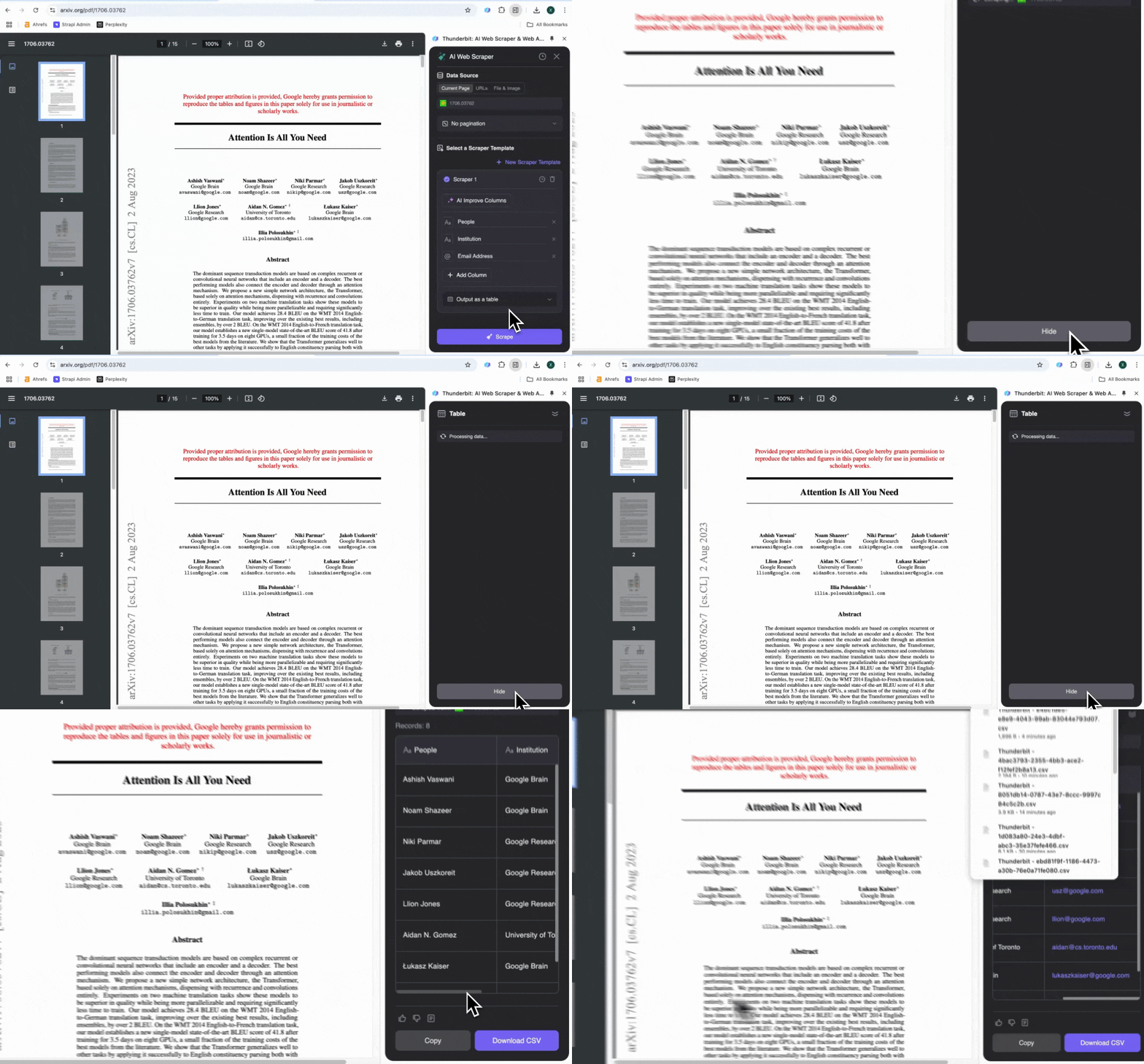
📊 Column Names: PDF Contact Data
🤔 Why Use Contact Information Scraper?
Scraping contact information can be incredibly useful for a variety of professionals:
- Marketers: Build targeted email lists for outreach campaigns.
- Recruiters: Gather candidate information from directories or resumes.
- Researchers: Collect contact details for academic or industry collaborations.
- Sales Teams: Generate leads by extracting contact information from company directories.
By automating the data collection process, the Contact Information Scraper saves time and ensures accuracy, enabling you to focus on more strategic tasks.
🛠️ How to Use Contact Information Scraper Chrome Extension
- Install the Scrapebit Chrome Extension: Download the extension and register your account.
- Navigate to the Target Page: Go to the directory, website, or PDF document you want to scrape.
- Activate AI-Powered Scraper: Click AI Suggest Columns to generate column names or customize columns to meet your needs.
💰 Pricing for Scrapebit Contact Information Scraper
Scrapebit operates on a credit-based system, where 1 credit equals 1 scraped row. The Contact Information Scraper is free to try, and additional plans offer flexibility for both occasional and high-volume users.
Plans:
Free Features:
- 6 pages per month on the Free Plan.
- 10 pages for free with the Free Trial, perfect for exploring the scraper’s features.
❓FAQs
-
What is the AI Powered Contact Information Scraper?
The AI Powered Contact Information Scraper is a tool designed to extract contact details from websites, directories, and PDFs. It leverages Scrapebit's AI technology to simplify data collection, making it accessible to users without technical expertise.
-
What is Scrapebit?
Scrapebit is a Chrome Extension that automates web scraping, form filling, and content summarization using AI. It is designed to save time and improve productivity for professionals in marketing, sales, research, and more.
-
Can I scrape contact information from PDFs?
Yes, Scrapebit supports scraping contact information from PDFs. Simply open the PDF in your browser, use the AI Suggest Columns feature, and extract the data in a structured format.
-
How many rows can I scrape with the free trial?
With Scrapebit’s free trial, you can scrape up to 10 pages for free. Each row of data extracted counts as 1 credit.
-
Can I customize the columns and data fields to scrape?
Absolutely! Scrapebit allows you to customize the columns and data fields to match your specific needs. You can use the AI Suggest Columns feature or manually adjust the settings.
-
What happens if I run out of credits?
If you run out of credits, you can purchase additional credits or upgrade to a higher-tier subscription plan. This ensures uninterrupted access to the scraper’s features.
-
Is it legal to scrape contact information from websites?
Scraping publicly accessible data is generally permissible, but it’s important to comply with applicable laws and respect privacy rights. Always use the data responsibly and ensure compliance with relevant regulations.
-
Does Scrapebit support subpage scraping?
Yes, Scrapebit supports subpage scraping, allowing you to extract additional details from linked pages. This feature is particularly useful for directories with individual profile pages.
🌐 Learn More
Ready to use this template?
Install the Scrapebit Chrome extension and start scraping in minutes.